
Account security instructions
Xingqiao Subscriptions collects only what an order needs, and never your account password. For every ChatGPT plan (Go, Plus, Pro and Credits) you paste the Session yourself after paying; the page reads the account email from it, and you confirm and submit. Claude needs the subscription account email, and during setup you forward the one-time login code you receive so support can sign in for you. After you paste the Session and before you submit it, the site uses it to ask ChatGPT what plan the account is on, to judge whether it can be topped up.
Key points
- Information needed to order
- ChatGPT: Session; Claude: email + one-time code
- Account password
- Never required
- ChatGPT plans
- Self-service Session submission after payment
- After the top-up
- Log out of all sessions in ChatGPT
On this page
1.What information do I need to provide when ordering?
- ChatGPT Go, Plus and Pro: Alipay / Card / Apple Pay goes through Stripe's secure payment page; enter the email you use to sign in to ChatGPT in the email field. For WeChat Pay, scan to pay, then click "I've paid". There is no order number before payment, so the WeChat payment note doesn't need one.
- Claude plans: For WeChat Pay, note the plan name and subscription account email in the payment note, or pay with Alipay / card / Apple Pay and enter your subscription account email; after payment, add WeChat support and send your order details. During setup you forward a one-time login code and support signs in for you.
- Order number and payment records: The ChatGPT order number (XQ-…) is shown at the top of the "Enter your info" page and is used for after-sales inquiries; Claude orders are verified with the payment record and subscription account email.
2.Why submit a Session instead of a password?
After paying for any ChatGPT order (Go, Plus, Pro or Credits), you submit a Session on the "Enter your info" page instead of your account password. A password you hand over can only be taken back by changing it, and many people reuse the same password on other sites; a Session contains no password, and you can invalidate it at any time in ChatGPT security settings without changing your password. It still grants account access, so treat it as sensitive and submit only your own account.
- How to get and submit the Session: First sign in to the ChatGPT account you want to top up in a browser on your computer or phone (the ChatGPT app can't give you the Session), then open https://chatgpt.com/api/auth/session, copy the whole page, every last character, and paste it into the "ChatGPT sign-in information" field. The page reads the account email from it; check it, then click "Submit". After you paste the Session and before you click submit, the page uses it to check the account's current subscription status with ChatGPT; only a free account with no active subscription can continue. Credits orders are the other way round: the account must have an active Plus or Pro plan. If you see "The Session format is invalid", copy the entire page content again.
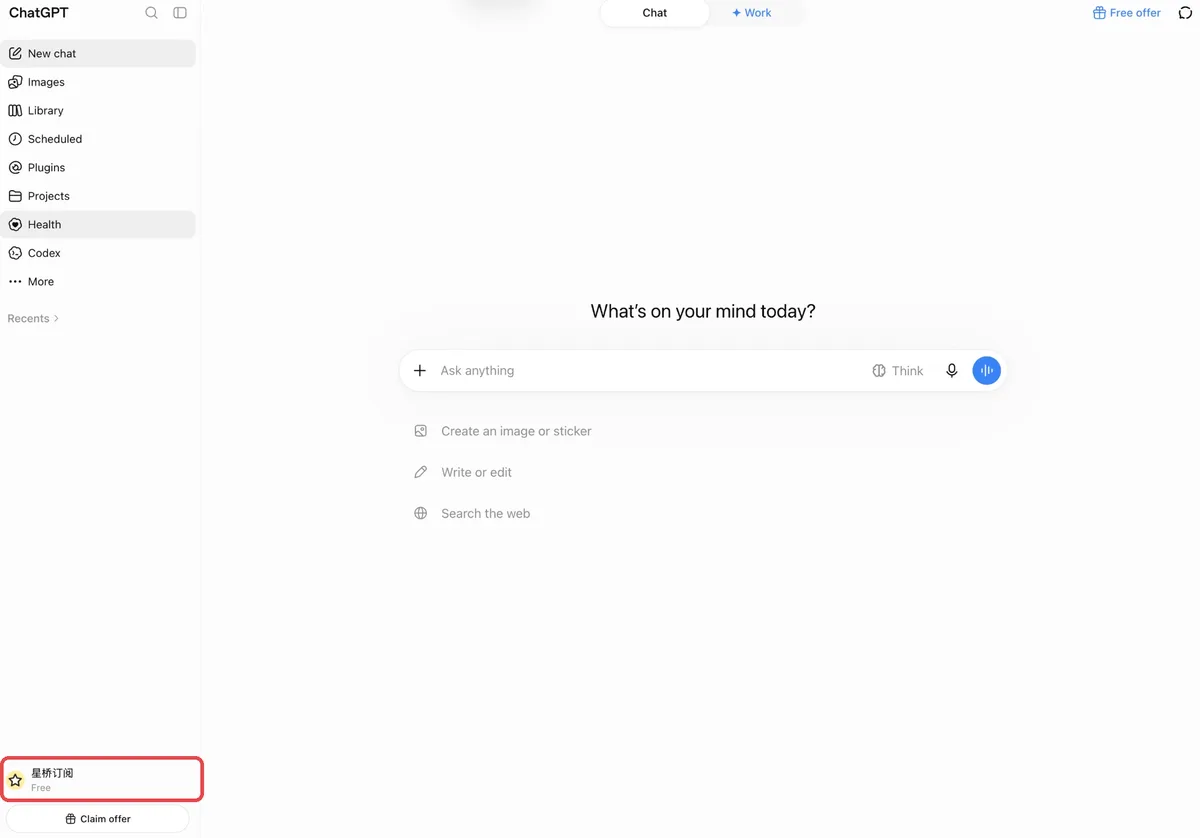
1. Sign in at chatgpt.com in a browser. "Free" at the bottom left means the account can be topped up. 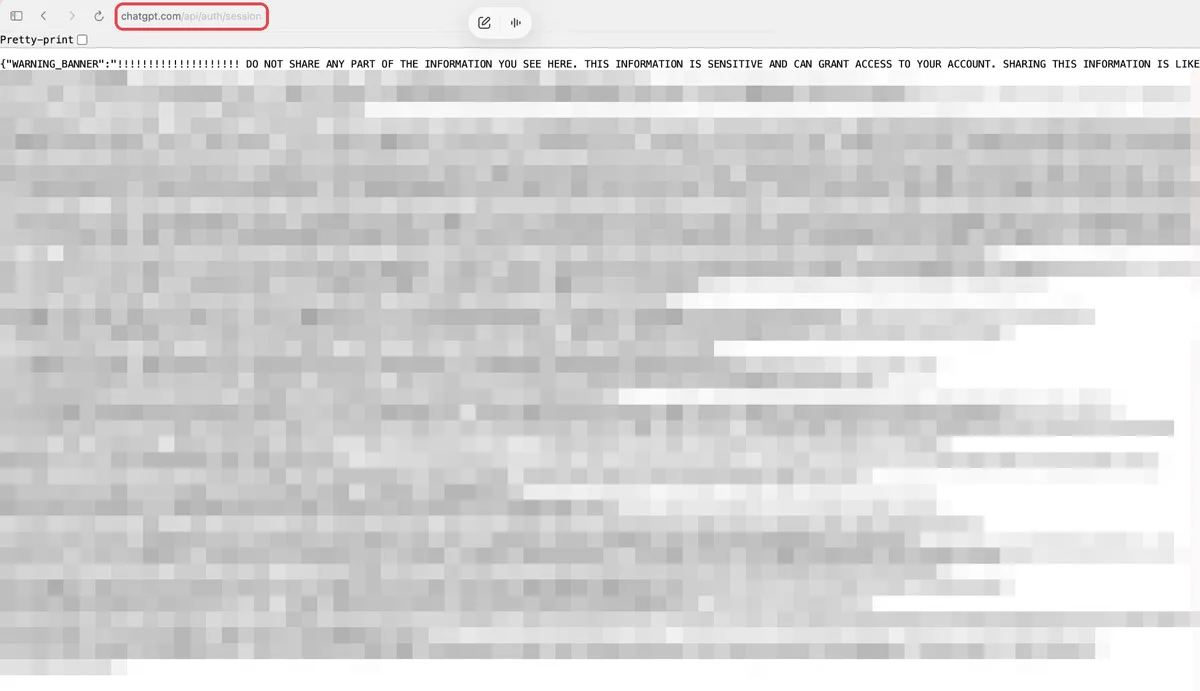
2. In the same browser, open chatgpt.com/api/auth/session. A long block of text appears (masked here). The "do not share" banner at the top is ChatGPT's generic warning; we use this text only to identify your account and complete this top-up. 
If the page shows only this one "do not share" line, the browser isn't signed in to ChatGPT. Sign in to the account to top up, then reopen the address. 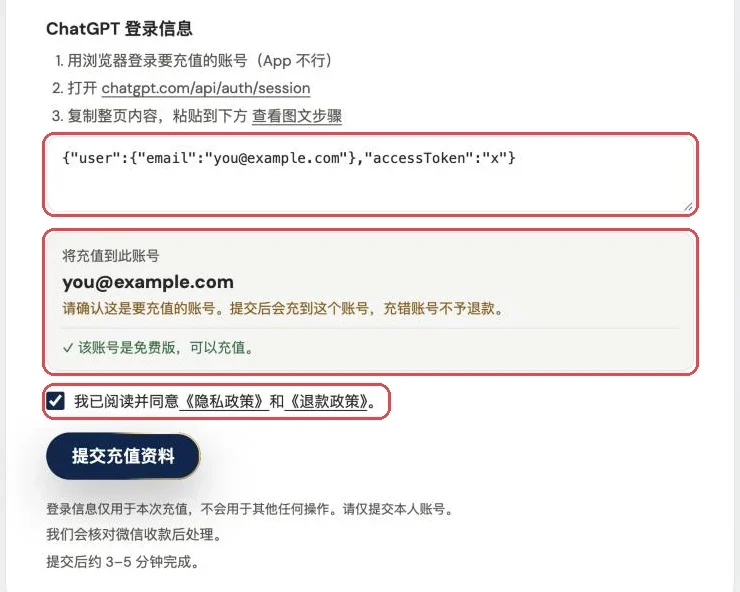
3. Select all, copy, and paste it into the sign-in info box. Once the page shows your account email and confirms the free plan, tick the privacy and refund policy box, then click Submit. (Sample data shown.) Check the email the page reads before submitting: the top-up goes to that account, and a wrong account is not refundable. - Claude needs a one-time login code, never a password: Claude Pro and Claude Max are set up by support starting a sign-in on Anthropic's own page, so you forward the one-time login code you receive. That code works only for that one sign-in, and Xingqiao Subscriptions never asks for your password.
3.What is the Session used for?
A Session is your ChatGPT sign-in state: whoever holds it can use the account as you until it stops working. So Xingqiao Subscriptions uses it in only two places. First, to decide whether the account can be topped up: after you paste it and before you click submit, the site uses it to check the account's current subscription status with ChatGPT. Go, Plus and Pro need a free account with no active subscription, and Credits need an active Plus or Pro plan; the check shows just the plan status and the expiry date. Second, to complete this order's top-up. The Session is not written to order records or to site logs. We never use it to change your password, email or sign-in method, we do not read your chats, and we do not use it again after the top-up. For ChatGPT orders, the top-up usually completes within 10 minutes after payment is verified, and WeChat orders are processed once the payment is confirmed; for Claude, support signs in and sets it up. Xingqiao Subscriptions does not sell pre-made or shared accounts, and does not help bypass platform rules.
4.When does the Session stop working?
A Session expires on its own when your ChatGPT sign-in expires; OpenAI decides how long that is. You don't have to wait: once the top-up is done, you can invalidate it yourself right away, as described in the next section.
5.After the top-up, how do I invalidate the Session right away?
First make sure the top-up succeeded: you have the completion notice, and ChatGPT shows the new plan in the bottom-left corner or in settings. Don't do this before the top-up is complete, or the expired sign-in will interrupt it.
- Open Active sessions: Sign in at chatgpt.com in a browser and go to Settings → Security → Active sessions.
- Log out of all sessions: Find Log out of all sessions, select Log out all, then choose Log out of all devices in the confirmation box. This signs out every device, including the Session you submitted; OpenAI says it may take up to 30 minutes.
- Sign back in: Every device is signed out, including the one you are using, so just sign in again. Your subscription is unaffected and your chats are still there.
6.What to keep in mind once the subscription is active?
- Official restrictions remain in place: Account status, region, and OpenAI product rules may still affect the result. Xingqiao Subscriptions does not assist with bypassing platform rules, account risk controls, or terms-of-service restrictions.
7.Frequently asked questions
Why do I need to submit a ChatGPT Session?
A ChatGPT Go, Plus or Pro order needs the account's signed-in state to process the subscription, and the Session stands in for the password, so no password or code is required. Claude works differently: after payment you add support and give them your email and a one-time login code, and support signs in to set it up. No password there either.
Why is my account's subscription status checked before I submit?
Go, Plus and Pro can only go onto a free account with no active subscription, while Credits need an active Plus or Pro plan. So the status is checked once after you paste the Session and before you submit, to avoid placing an order for an account that doesn't qualify. The check returns only the plan status and the expiry date; the Session is not written to order records or to site logs.
Can I buy a pre-made or shared account?
No. Xingqiao Subscriptions does not sell registered accounts, shared accounts, or accounts with historical data; use a ChatGPT account you own and can log in to normally.
Will Xingqiao Subscriptions view my chats?
No. The Session is used only for this one subscription top-up: checking the account's current subscription status before you submit, and completing this order's top-up — nothing else. It is not written to order records or to site logs. Once the top-up is done, you can log out of all sessions under ChatGPT Settings → Security → Active sessions to invalidate it right away.
After the top-up, how do I invalidate the Session I submitted?
In ChatGPT, go to Settings → Security → Active sessions, choose Log out of all sessions, then Log out of all devices in the confirmation box. OpenAI says it may take up to 30 minutes. Do this only after the top-up has succeeded; your subscription and chats are unaffected, and you just sign in again.
Can I place an order without a ChatGPT account?
It is not recommended. First prepare a ChatGPT account you own, whose email can be verified, and that you can log in to normally; Xingqiao Subscriptions does not provide pre-made or shared accounts.
Does Xingqiao Subscriptions support annual ChatGPT billing?
ChatGPT Plus currently does not support an official annual plan or prepayment for multiple months. Xingqiao Subscriptions only provides the monthly services listed on the page and does not promote non-existent official annual plans.
If you have any questions about account security, please ask first before making payment. If your account has risk control, region, login or verification issues, please contact support first to explain the situation. It is not recommended to place an order blindly.